
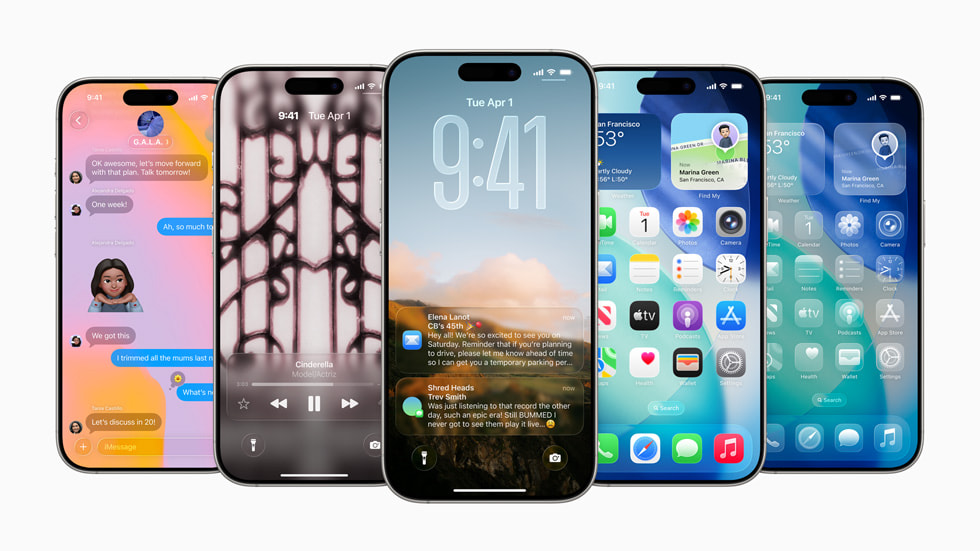
Ladies and gentlemen, your iPhone just got a serious shake-up. Apple has rolled out iOS 26.1—and this time it’s less about flashy features and more about fixing the mess of iOS 26. Yes, the one that had a lot of us scratching our heads (and draining batteries). Let’s dive in.
What hit the street
The update landed on 3 November 2025 for eligible iPhones (though exact rollout may slightly vary). It’s the first major update after the iOS 26 launch in September. It’s compatible with iPhone 11 and newer, and includes the second-generation iPhone SE.
The installation path is familiar: Settings → General → Software Update. Agree you should back up your phone and plug it in. Because yes, the download is hefty.
Why it matters (especially in Africa)
If you’re in Nigeria, Kenya, South Africa, Ghana—heck, anywhere where power cuts aren’t a myth, this update is a lifeline. Battery drain and sluggish performance were big complaints post-iOS 26. With 26.1, Apple has done some behind-the-scenes work to make older phones breathe easier. For many users on iPhone 11 or iPhone 12, better stamina means fewer woes between charges.
And there were other glitches: accidental camera launches, UI weirdness, sluggish response times. Those are now on notice.
The design fix: “Liquid Glass”, reined in
We all saw the new look: the “Liquid Glass” design language introduced with iOS 26. Beautiful on paper, brutal in practice for readability. Now, iOS 26.1 gives you control:
- Toggle between Clear (high transparency) and Tinted (higher opacity, better contrast) mode.
- Path: Settings → Display & Brightness → Liquid Glass.
- It affects Lock Screen, notifications, search bars; app icons still individually adjustable.
Accessibility modes remain for “Reduce Transparency” and “Increase Contrast”, deeper under Settings → Accessibility. In short: Apple heard you.
Daily chores just got smoother
Here are the practical fixes that matter:
- Lock Screen camera swipe? You can disable it now. If camera launching itself was draining your battery or taking unintended snaps—this ends that nuisance.
- Alarms/timers? You’ll now need to swipe to turn off an alarm instead of a simple tap—reduces accidental dismissals.
- iPad users (yes, affects them too) get smoother multitasking with Slide Over.
- Media/UI controls: New swipe gestures in Apple Music—you can swipe in the MiniPlayer to skip songs. Local capture (audio/video) gets more control: external USB mic gain control, save location of recordings.
If you’re a creator, or a power user, you’ll feel these little upgrades.
Security, privacy & child-safety upgraded
Deep changes here too. Apple didn’t just polish the UI—they locked down some doors.
- Child safety defaults: Features like Communication Safety and Web Content Filters are now enabled by default for 13–17-year-old accounts. No longer “go turn this on” — Apple is doing it automatically in many regions.
- Security patches: Around 50 fixes that tackle high-risk bugs. One example: the Mail app issue where remote content could load even when privacy settings were off. Another: memory flaw letting some apps access private user data without full permission. These are relevant everywhere—but especially in places like Nigeria, Kenya, Ghana, where apps often ask for contact/message/location access. With 26.1, Apple makes it harder for intrusive tools to sneak in.
If you care about your data (and you should), this is a big deal.
Battery & performance: the hidden win
Now we come to the “did Apple actually fix it?” section. Short answer: yes, noticeable improvement.
- Early reports: iOS 26 caused battery drain, complaints all over.
- With 26.1: Apple changed the graphics engine—removed some HDR effects, cut back on high-power animations in notifications. Older devices like iPhone 11 and 12 should run smoother, longer on a single charge.
- Tests (e.g., iPhone 17 Pro Max) found that choosing Clear vs Tinted Liquid Glass didn’t significantly affect battery life. So the design toggle is more about readability than battery cost.
- If you use Low Power Mode, Adaptive Power Mode or Dark Mode (especially helpful where power is scarce anyway), you’ll feel the improvement in real-world use.
In regions with erratic power supply or crowded charging spots, every extra hour counts.
Should you update now?
Yes. Here’s the blunt take: If your device is eligible (iPhone 11 or newer) you should be installing this right away. It’s not just a “nice to have”—it corrects real pain points, and locks down weaknesses.
For teams or businesses managing multiple iPhones: roll it out quickly. The security improvements, the battery fixes, the UI consistency—they matter for productivity and risk.
The bottom line
While iOS 26 had ambitious interface changes and bold ideas, the initial rollout left a trail of complaints—battery issues, readability problems, unintended behaviours. With iOS 26.1, Apple shifts gears: no major new front-page features, but a serious cleanup. The toggles for Liquid Glass, camera swipe disable, alarm swipe, stronger safety defaults, 50+ security patches—they sum up to an important update.
So go to Settings → General → Software Update and install. If you’ve been holding off, now is the time.
That’s the download.